1980s Retro Style: Create Viral Vintage Photos and Videos
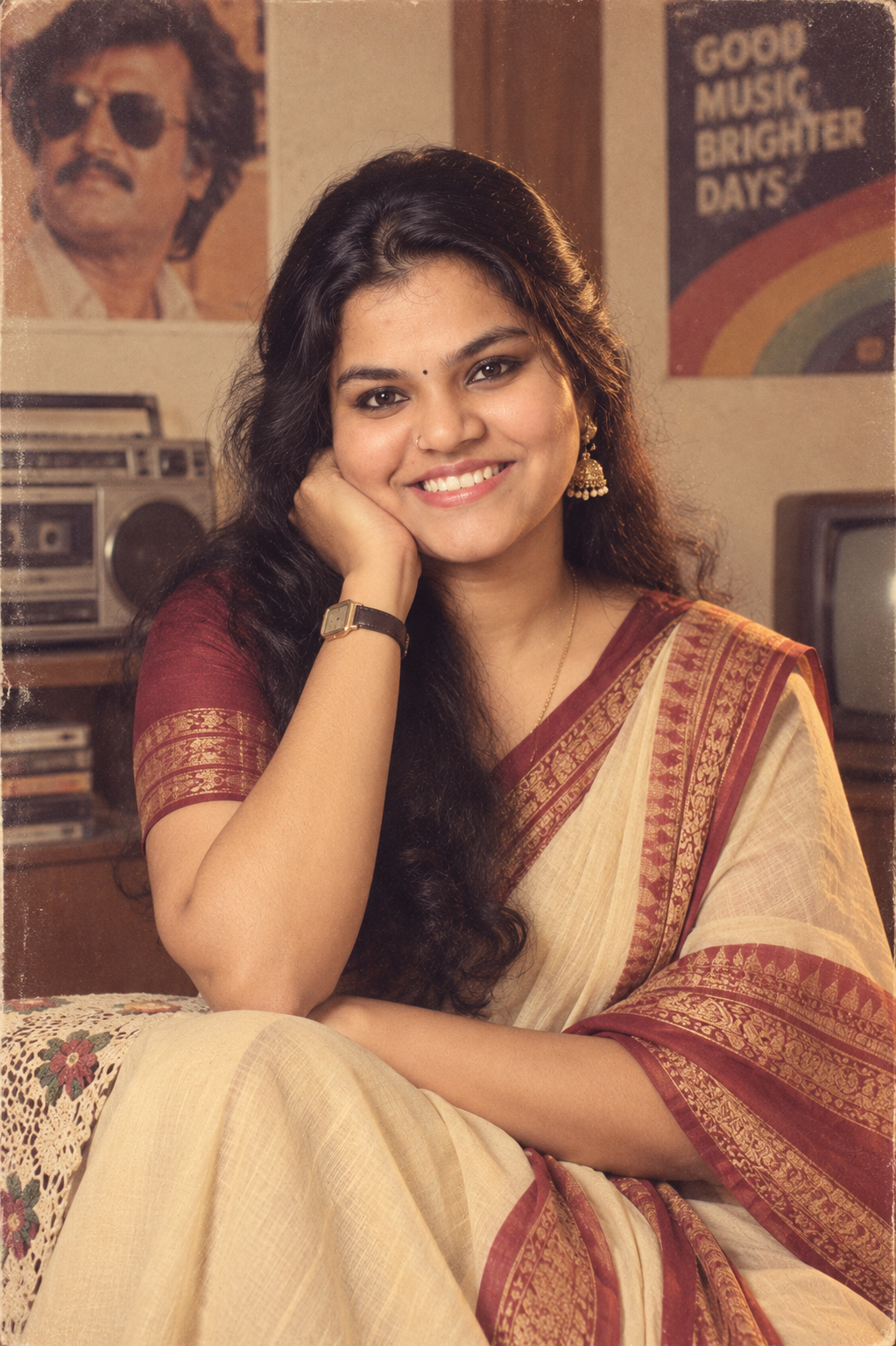
The 1980s retro style is becoming a popular way to transform modern portraits into nostalgic-looking photos and videos. Instead of simply applying an old-photo filter, this trend recreates the hairstyle, clothing, surroundings, lighting and film characteristics associated with the 1980s.
The result can look like an old family photograph or a scene from an Indian film from that era.
You can create the photo using tools such as ChatGPT or Google Gemini and then experiment with Google Flow to turn the retro concept into a moving video.
How to Create an 1980s Retro Photo
Start with a clear portrait where the person’s face is easy to see. A front-facing or naturally posed photograph usually works better than an image with heavy filters, extreme shadows or motion blur.
Upload the reference photo to your preferred image-generation tool and use a detailed prompt describing the period you want to recreate.
The important part is to describe the entire scene, not just the colour of the photograph.
For example, the prompt can specify 1980s Indian clothing, hairstyles, accessories, architecture, vehicles, furniture, lighting and consumer 35mm film characteristics.
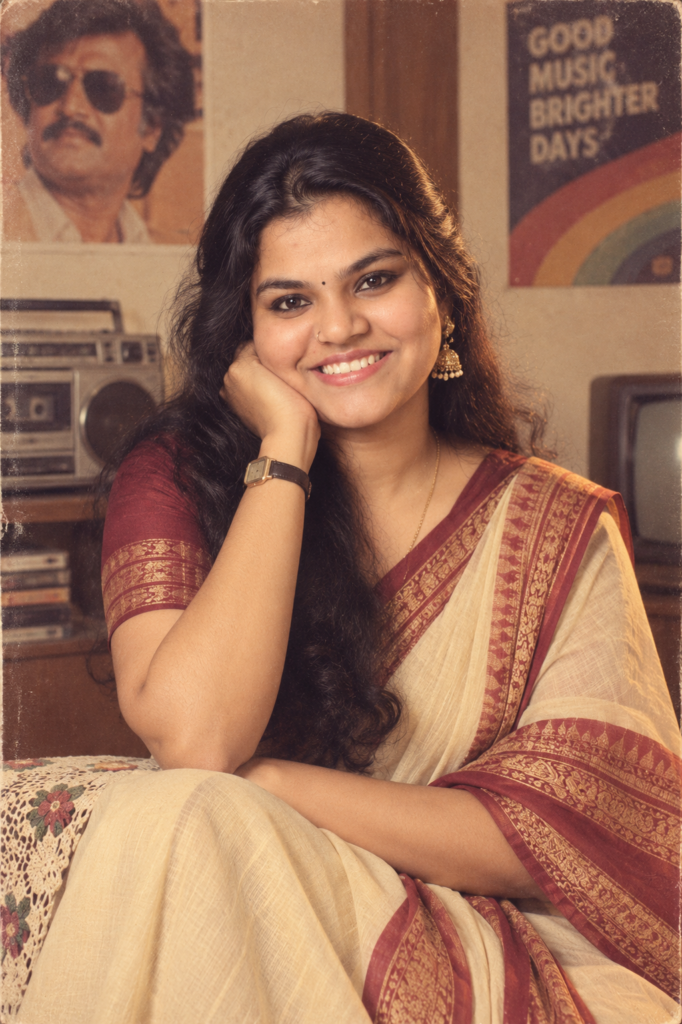
1980s Retro Photo Prompt
After creating the still image, you can use an AI video-generation tool to bring the scene to life.
Google Flow or Gemini is designed for AI filmmaking and can be used to create cinematic video clips from text and visual references. It is particularly useful when you want to introduce camera movement, character movement and environmental motion into a retro scene.
For better consistency, use the generated retro photograph as the visual reference and clearly describe the movement you want.
1980s Retro Video Prompt
ChatGPT, Gemini or Google Flow?
Each tool can be useful at a different stage of the process.
ChatGPT can be used to create and edit images from a reference photograph.
Google Gemini can also be used for image transformation and experimentation with different visual styles.
Google Flow is better suited to the next step when you want to turn a visual concept into a cinematic video.
You don’t necessarily need to use all three. Choose the tool based on whether you want a still image, an edited image or a video.
How to Make the 1980s Look More Authentic
A convincing retro result depends heavily on the details included in the prompt.
Instead of asking for a generic “vintage photo,” describe the visual characteristics of the period.
1. Use Period-Accurate Clothing
Mention clothing styles that make sense for the setting and person. Indian shirts, sarees, dresses, trousers, jewellery and other accessories can immediately establish the decade.
2. Change the Environment
The background is just as important as the person.
Ask for an Indian environment appropriate to the 1980s, including period-appropriate homes, streets, shops, vehicles, furniture and signage.
3. Avoid Modern Objects
Modern smartphones, LED displays, contemporary cars, modern buildings and current fashion can immediately reveal that the image is a recreation.
Tell the image model to remove modern elements from the scene.
4. Describe Film Characteristics
Real photographs from the period did not have the perfectly sharp digital appearance common today.
A believable recreation can include subtle film grain, slightly softer details, warm colours, mild halation, small exposure variations and natural skin texture.
Don’t overdo these effects. Heavy grain and extreme colour fading can make the result look like an artificial vintage filter.
How to Get Better Facial Consistency
If you are transforming a personal photograph, use a high-quality reference image with the face clearly visible.
The prompt should tell the model to preserve the person’s recognizable facial identity and key facial characteristics while changing the period styling.
However, no image-generation system can guarantee perfect facial consistency in every generated image or video. If the face changes noticeably, try a clearer reference image and reduce unnecessary changes to the person’s pose and facial expression.
For video generation, identity consistency can be more challenging because the model has to maintain the character across multiple frames.
Photo vs Video: Which Looks Better?
A still image is generally easier to control because the model only needs to produce one frame.
Video generation introduces additional challenges such as facial consistency, hand movement, body motion and background changes.
If you want the most convincing result, create the still image first and use that image as the reference for the video.
This gives you more control over the character’s clothing, appearance and overall period styling before introducing motion.
Ideas for 1980s Retro Videos
Once you have a good reference image, you can experiment with different scenes:
- Walking through an old Indian street
- Sitting inside a classic family living room
- Riding in a period-appropriate vehicle
- Standing outside an old cinema theatre
- Shopping at a traditional local market
- A family gathering at home
- A school or college-inspired 1980s setting
- A Bollywood-inspired cinematic scene
- A nostalgic wedding environment
- A simple everyday Indian street scene
Keep the movement subtle when aiming for realism. Slow walking, natural head movement and gentle camera motion often produce more believable results than complicated action sequences.
Why the 1980s Retro Style Is Popular
The trend works because it combines nostalgia with personal photographs.
Instead of looking at an old photograph of an unknown person, people can recreate themselves, their families or familiar environments in a period they may remember from childhood.
For Indian audiences, the effect can become even more recognisable when the prompt includes familiar details such as older homes, local streets, traditional clothing, classic vehicles and period-specific interiors.
The best results are not necessarily the most heavily edited ones. Small details can make a bigger difference than adding extreme vintage effects.
Tips Before Sharing Your Creation
Before posting the final image or video, check the generated result carefully.
Look for:
- Facial changes
- Unnatural hands or fingers
- Distorted jewellery
- Incorrect clothing details
- Strange background objects
- Modern objects accidentally appearing
- Inconsistent vehicle designs
- Unnatural text or signage
- Flickering facial features in video
- Sudden changes between video frames
If something looks wrong, regenerate the image or modify the prompt rather than publishing an obviously distorted result.
Also, present recreated scenes honestly. A generated image should not be described as an actual historical photograph if it was created using an AI tool.
Final Take
The 1980s retro style is more interesting when the entire scene is recreated instead of simply applying a vintage filter.
Start with a good reference photograph, establish the period through clothing and surroundings, and then add realistic 35mm film characteristics. Once the still image looks right, use it as a reference for a short video.
The combination of detailed prompting and careful editing can produce convincing nostalgic visuals while still making it clear that the scene is a creative recreation.
Frequently Asked Questions
Can I create an 1980s retro photo from my current picture?
Yes. You can upload a suitable reference photograph to an image-generation tool and describe the 1980s styling, environment and photographic characteristics you want.
Which tool can I use for an 1980s retro photo?
ChatGPT and Google Gemini are two options for experimenting with reference-image transformations. Results can vary depending on the reference photograph and prompt.
Can I turn an 1980s photo into a video?
Yes. A generated still image can be used as a reference for AI video-generation tools such as Google Flow.
How can I make the image look like a real old photograph?
Focus on period-accurate clothing, surroundings and photography characteristics. Subtle 35mm film grain, warm colours, slight softness and natural exposure variation can help.
Why does the face sometimes change?
Image and video models can alter facial details during generation. A clear reference image and explicit instructions to preserve recognizable facial characteristics can improve consistency, but perfect identity preservation is not guaranteed.
Can I use these images on Instagram?
Yes, provided the content follows the platform’s rules and you do not misrepresent a recreated image as an authentic historical photograph.
More AI Tools & Prompt Ideas from Sahasra Tech
If you enjoyed creating the 1980s retro style, check out these related AI tutorials and prompt ideas from Sahasra Tech: