
In This Guide Show
You can use ChatGPT or Gemini as a free mock interviewer: paste the job description and your resume, ask it to question you one at a time, answer in your own words, and get feedback after each answer. It is good for practising structure, clarity and confidence. It cannot tell you what a real interviewer at a specific company will ask, so treat it as practice, not prediction.
What AI interview practice is good for (and what it is not)
- Good for: common HR questions, explaining your projects clearly, the STAR structure for behavioural answers, basic technical revision, and speaking without long pauses.
- Not reliable for: “exact questions asked at company X”, current salary figures, or hiring policies. AI tools can state such things confidently and still be wrong. Our article on why ChatGPT answers feel wrong sometimes explains why.
Step 1: Collect three things
- The job description. Copy the full text from the job post.
- Your resume as text. Remove your phone number, address and any ID numbers before pasting. The tool does not need them.
- The round you are preparing for. HR, technical, managerial or campus placement.
Step 2: Set up the interviewer
Start a new chat and paste this, filling in the brackets:
Act as an interviewer for the role of [job title] at a [type of company, for example mid-size IT services company in India]. This is the [HR / technical / managerial] round for a candidate with [fresher / 3 years] experience.

Job description:
[paste here]

My resume:
[paste here]

Rules:
1. Ask one question at a time and wait for my answer.
2. Mix questions from my resume, the job description and common questions for this round.
3. After each answer give short feedback: what was good, what was missing, and a score out of 10.
4. Then ask the next question. Ask a follow-up if my answer was vague.
5. After 8 questions, give an overall summary with my three weakest areas.
Do not write model answers unless I ask.
The last line matters. If the tool writes perfect answers for you, you will be tempted to memorise them, and memorised answers are easy to spot in a real interview.
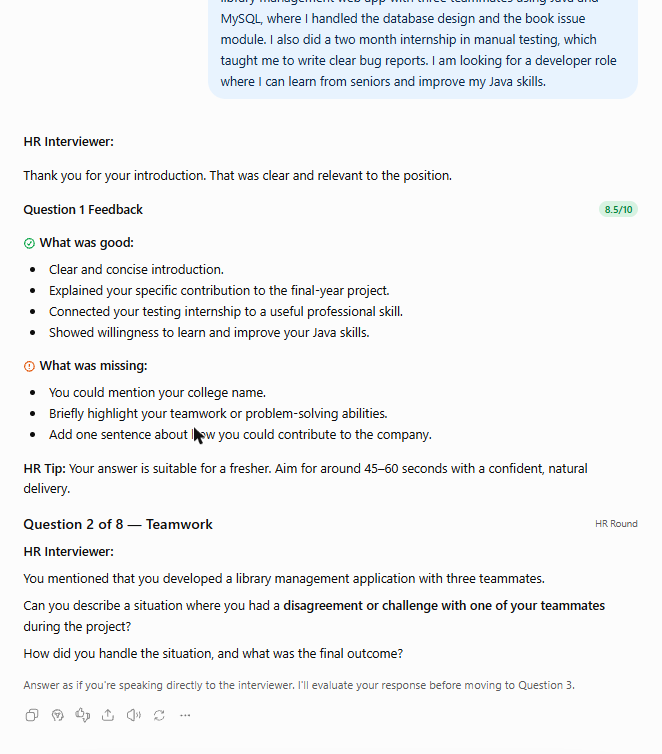
Step 3: Answer the way you will in the real interview
Typing lets you edit, but real interviews do not. Two ways to make practice realistic:
- Use voice. Both the ChatGPT and Gemini mobile apps have a voice conversation mode. The exact button and what is available on a free account vary by app version. Speak your answer aloud and let the tool respond.
- Or use the microphone key on your phone keyboard to dictate, and do not correct the text before sending. The feedback will then reflect how you actually speak.
Keep each answer to about one or two minutes. If you speak for much longer, ask the tool to tell you where you started repeating yourself.
Step 4: Fix weak answers with the STAR structure
For questions like “Tell me about a time you handled a difficult situation”, interviewers usually look for a clear story. STAR stands for Situation, Task, Action and Result. Ask the tool to check your answer against it:
Here is my answer to "[question]":
[your answer]

Check it against the STAR structure. Tell me which part is weak or missing, whether my own contribution is clear, and whether the result is specific. Then ask me two questions that will help me improve it. Do not rewrite the answer for me.
Use only real experiences. If the tool suggests adding an achievement or a number that did not happen, ignore it. A follow-up question in the real interview will expose it.
Step 5: Practise the questions you fear most
Based on my resume, list the 10 toughest questions an interviewer could ask me, including gaps, low marks, job changes or missing skills from the job description. Then ask them to me one by one and give honest feedback.
This is the most useful session. Career gaps, a low percentage, a switch of field or a missing skill are easier to explain once you have said the answer aloud a few times.
Useful follow-up prompts
- Self-introduction: “Here is my self-introduction. Tell me what to cut so it stays under 90 seconds, without changing my own words more than needed.”
- Technical revision: “Ask me 10 basic to medium questions on [topic], one at a time. If I am wrong, explain the concept simply and ask a similar question again.”
- Questions for the interviewer: “Suggest five sensible questions I can ask at the end of an interview for this role.”
- English fluency: “Point out grammar mistakes in my last answer and show the corrected sentence. Keep my simple style.”
- Regional comfort: you can ask for feedback in Telugu, Hindi or another language while still answering in English.
Mistakes to avoid
- Memorising AI-written answers. They sound generic and many candidates end up with the same lines.
- Trusting company-specific claims. Verify the interview process on the company’s own careers page or with people who work there.
- Pasting confidential work. Do not paste client names, internal code or documents from your current employer.
- Practising only once. Short daily sessions for a week help more than one long session the night before.
- Using AI during the actual interview. It is dishonest, interviewers notice, and it can cost you the offer.
A simple one-week plan
- Day 1: self-introduction and “why this role”.
- Day 2: resume walk-through, project by project.
- Day 3 and 4: technical or role-specific questions.
- Day 5: behavioural questions with STAR.
- Day 6: the toughest-questions session.
- Day 7: one full mock round by voice, then rest.
After the interview, the same tools can help you write a short thank-you note. See how to use AI to write emails that do not sound like a robot.
FAQ
Can ChatGPT or Gemini conduct a mock interview for free?
Yes. Free accounts on both tools can run a text-based mock interview. Voice features and usage limits depend on the app version and plan.
Will AI tell me the exact questions a company asks?
No. It can only produce likely questions based on the job description and common practice. Treat any company-specific claim as unverified.
Should I memorise the answers AI writes?
No. Use AI for feedback on your own answers. Memorised, generic answers are easy for interviewers to notice and fall apart on follow-up questions.
Is it safe to paste my resume into an AI tool?
Remove your phone number, address, ID numbers and any confidential employer information first. The tool only needs your education, skills and experience.
Can I practise in Telugu or Hindi?
Yes. You can ask the tool to explain feedback in your language while you continue answering in English, which helps you understand the corrections clearly.
2 thoughts on “How to Practise Job Interviews With ChatGPT or Gemini”