
In This Guide Show
You can check your EPF (PF) balance in four ways: a missed call to 9966044425, an SMS to 7738299899, the EPFO member passbook website, or the UMANG app. The missed call and SMS options work only from the mobile number registered with your UAN. This guide explains each method step by step and what to do if it does not work.
What you need before you start
- UAN (Universal Account Number): a 12-digit number given to every EPF member. You can find it on your salary slip or ask your employer’s HR team.
- Registered mobile number: the number linked to your UAN on the EPFO member portal.
- KYC seeded with UAN: for the SMS and missed call services, your UAN should be linked with your bank account, Aadhaar or PAN.
- Activated UAN: for the website and UMANG app, you need to have activated your UAN and set a password on the EPFO member portal.
Method 1: Missed call (no internet needed)
- From your registered mobile number, dial 9966044425.
- The call disconnects automatically after a ring or two. There is no charge for this call.
- You will receive an SMS from EPFO with your latest PF balance and recent contribution details.
This is the easiest method for people who do not use smartphones or have weak internet.
Method 2: SMS
- Open the messages app on your registered mobile number.
- Type EPFOHO UAN ENG and send it to 7738299899. Type the words exactly as shown. Do not replace “UAN” with your number.
- EPFO replies with your balance details by SMS.
The last three letters choose the reply language. Use ENG for English, HIN for Hindi, TEL for Telugu, TAM for Tamil and BEN for Bengali. EPFO supports a few more regional languages too. For example, send EPFOHO UAN TEL for a Telugu reply.
Method 3: EPFO member passbook website
The passbook shows every monthly contribution from you and your employer, plus interest, so it gives more detail than an SMS.
- Open the official EPFO member passbook portal (link in the Official Resources box below).
- Enter your UAN, password and the captcha. Then enter the OTP sent to your registered mobile.
- Select the member ID of your current or past employer.
- Your passbook opens with the employee share, employer share and pension contribution. You can download it as a PDF.
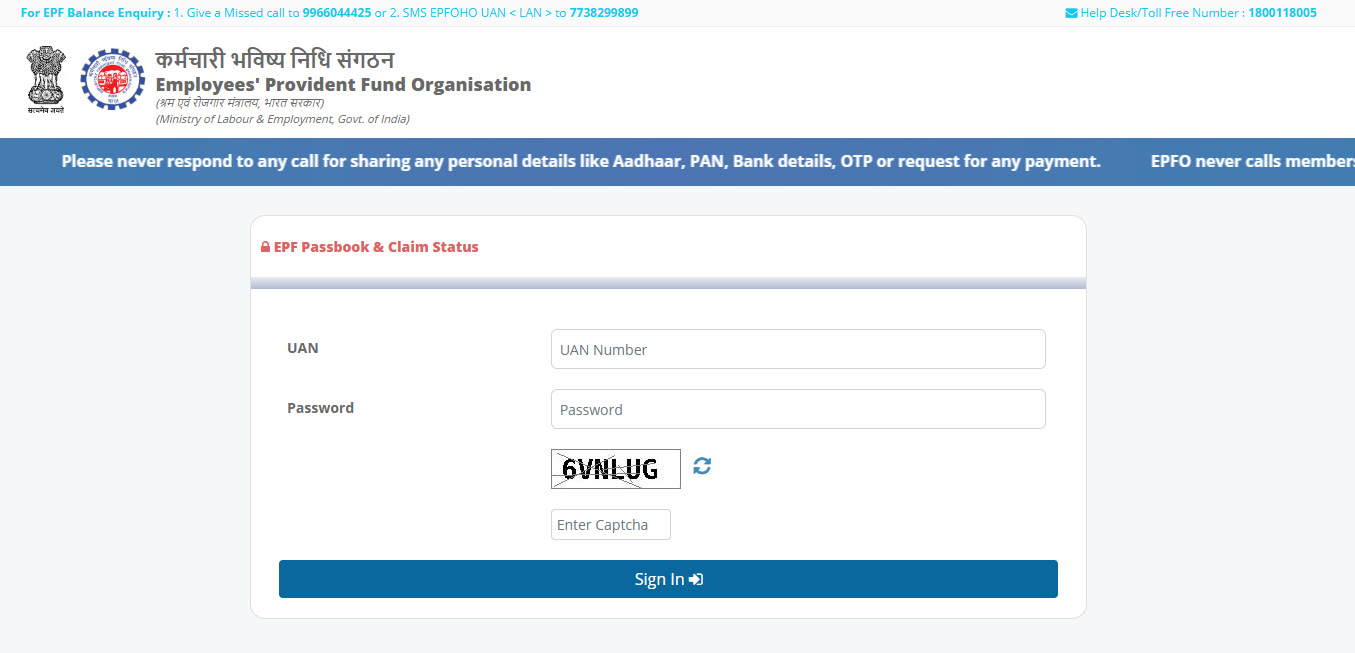
If you have never logged in before, first activate your UAN on the EPFO unified member portal. Note that the passbook may not show the latest month’s contribution if your employer has not deposited it yet.
Method 4: UMANG app
- Install the UMANG app (Unified Mobile Application for New-age Governance) from the Play Store or App Store.
- Register with your mobile number and OTP.
- Search for EPFO in the app.
- Choose View Passbook, enter your UAN and the OTP.
- Select your member ID to see the balance and contributions.
The menu names inside UMANG can change with app updates, but the EPFO section and passbook option are usually easy to find with the search bar.
Which method should you use?
- Quick balance check: missed call or SMS.
- Full month-wise details: member passbook website or UMANG.
- No smartphone: missed call.
- Checking an old employer’s PF: passbook website, where you can pick the old member ID.
Why the balance check may not work
- Wrong mobile number: the call or SMS must come from the number registered with your UAN. You can update your mobile number after logging in to the EPFO member portal.
- KYC not linked: if your bank account, Aadhaar or PAN is not seeded with your UAN, the SMS service may not reply. Check the KYC section on the member portal or ask your employer to approve pending KYC.
- UAN not activated: activate it on the unified member portal before using the passbook or UMANG.
- Server busy: EPFO websites can be slow at times. Try again later.
- Balance looks low: your employer may not have deposited recent contributions, or interest for the year may not be credited yet.
Stay safe from PF scams
EPFO never asks for your UAN password, OTP or bank details over phone calls, WhatsApp or SMS. Do not share OTPs with anyone who calls claiming to “speed up” your PF withdrawal. Use only the official EPFO websites and the UMANG app. Our guide on UPI scam messages and calls to never trust explains common tricks that also apply here.
FAQ
Can I check my PF balance without UAN?
Yes, with the missed call service from your registered mobile number, as long as your UAN is linked to that number and your KYC is seeded. For the website and UMANG app you need your UAN.
Is the missed call to 9966044425 free?
Yes. The call disconnects automatically, so you are not charged for it.
How do I get the PF balance SMS in Telugu?
Send EPFOHO UAN TEL to 7738299899 from your registered mobile number.
Why is my latest contribution missing from the passbook?
Your employer may not have deposited it yet. Contributions appear after the employer files and pays for that month.
Does EPFO call people to ask for OTP?
No. EPFO does not ask for OTPs, passwords or bank details on calls or messages. Treat such calls as fraud.