Sahasra Tech
Simplifying Tech In Telugu
Personal Style Report AI Prompt for AI color, hairstyle, outfit and eyewear analysis

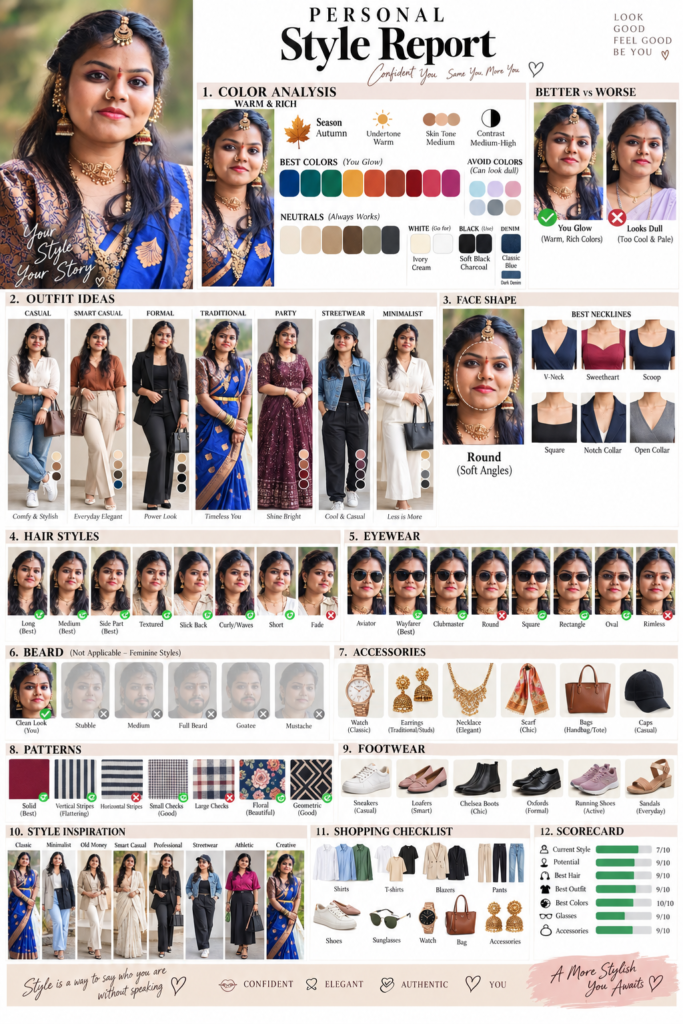
Personal Style Report AI Prompt 2026 : Create a Visual Style Analysis From Your Photo

Personal Style Report AI Prompt: Create a Visual Style Analysis From Your Photo

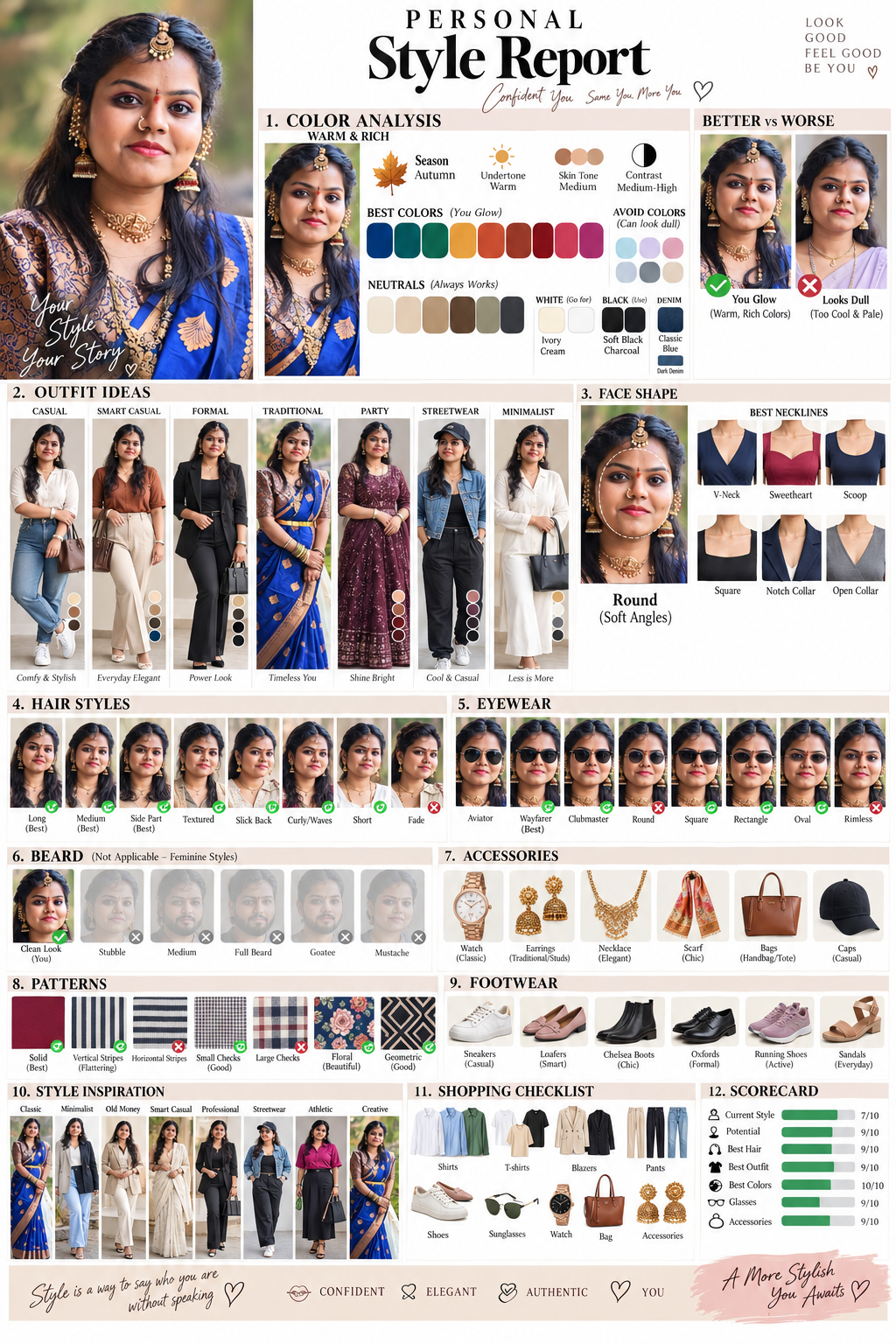
Want to see what colors, hairstyles, outfits, glasses and grooming styles suit you? This Personal Style Report AI Prompt turns your uploaded portrait into a personalised visual style guide.

It is designed to keep the same facial identity across hairstyle, outfit, eyewear and before-and-after comparisons.

What This AI Style Prompt Includes

The prompt asks AI to analyse:

  • Face shape
  • Skin tone and undertone
  • Seasonal colour palette
  • Hairstyles
  • Eyewear
  • Grooming
  • Outfits
  • Accessories
  • Patterns
  • Footwear
  • Overall style
  • Shopping recommendations

The focus is on creating a visual fashion report, not a page full of text.

Copy the Personal Style Report AI Prompt

Upload a clear portrait and paste the prompt below.
Personal Style Report AI Prompt for AI color, hairstyle, outfit and eyewear analysis
✦ AI PROMPT

Unlock Full Prompt

Tap below to reveal the prompt
ACT AS A PROFESSIONAL IMAGE CONSULTANT, PERSONAL STYLIST, COLOR ANALYST, FACE-SHAPE EXPERT, HAIRSTYLIST, GROOMING CONSULTANT AND FASHION ART DIRECTOR. Create a PREMIUM VISUAL PERSONAL STYLE REPORT BY SAHASRA TECH based on the uploaded portrait. IMPORTANT: The uploaded image may contain ANY GENDER, including a woman, man, or any other adult subject. Analyze the actual person shown in the uploaded reference and adapt all recommendations to that person. Do NOT assume gender from this prompt. ================================================== 1. PRIMARY REFERENCE + STRICT FACIAL IDENTITY ================================================== USE THE UPLOADED IMAGE AS THE PRIMARY AND STRICT IDENTITY REFERENCE. The person in the uploaded image is the ONLY identity to use throughout the entire report. Maintain the EXACT recognizable facial identity of the reference subject across every portrait, outfit card, comparison, hairstyle example, eyewear example, beard/grooming example and before/after panel. PRESERVE: – exact face shape – facial proportions – forehead shape and width – hairline – eyebrow shape, thickness and placement – eye shape, size, spacing and eyelid structure – nose bridge, width, length and tip – cheek structure – cheekbone placement – lips shape, size and proportions – natural smile – teeth appearance – jawline – chin shape and projection – ears and ear placement – natural skin tone – natural skin texture – natural facial asymmetry – natural hair density and hairline – facial-hair pattern where applicable – approximate age and overall appearance DO NOT redesign the person’s face. DO NOT create a generic attractive AI face. DO NOT substitute another model. DO NOT use different faces in different panels. DO NOT blend the reference face with another person’s facial features. DO NOT beautify the face into an unrealistic model. DO NOT slim, widen, lengthen or reshape the face. DO NOT change the eyes, nose, lips, jaw, chin or facial proportions. DO NOT change gender presentation unless the uploaded reference itself requires it. DO NOT change the person’s recognizable identity. The subject must remain unmistakably the SAME PERSON in every panel. ================================================== 2. STRICT PHOTOREALISTIC FACE QUALITY ================================================== ALL HUMAN FACES MUST LOOK LIKE REAL PROFESSIONAL PHOTOGRAPHS. Use: – high-end full-frame camera realism – premium portrait photography – realistic skin texture – visible natural skin pores – realistic fine facial details – realistic eyes – sharp iris detail – realistic eyelashes – realistic eyebrows – individual hair strands – individual beard/facial-hair strands where applicable – realistic lips – realistic teeth – natural facial shadows – realistic skin highlights – accurate skin depth – natural photographic lighting NO: – oil painting – oil-paint texture – watercolor – gouache – digital painting – illustration – cartoon – anime – 3D face – CGI face – plastic skin – waxy skin – porcelain skin – airbrushed skin – beauty-filter skin – excessive skin smoothing – artificial skin glow – painterly facial texture – blurry face – distorted eyes – distorted teeth – altered nose – altered jawline – artificial facial symmetry – generic AI facial features The report itself may have an editorial/Pinterest/magazine design, but HUMAN FACES MUST REMAIN PHOTOGRAPHIC. Graphics, icons, swatches and typography can be stylized. Faces cannot. ================================================== 3. FACIAL DETAIL PRIORITY ================================================== FACIAL REALISM AND IDENTITY HAVE THE HIGHEST PRIORITY. If there is a conflict between: – more decorative graphics – more text – more tiny cards – more outfit thumbnails – more accessories AND facial quality, PRIORITIZE FACIAL QUALITY. Do NOT make important portraits too small. Use fewer but larger photographic portraits when necessary. Keep the main portrait large and extremely detailed. Important hairstyle, eyewear, grooming and outfit comparison portraits must also be large enough to preserve facial identity. Never sacrifice facial realism simply to fit more cards. ================================================== 4. SAME PERSON IN EVERY BEFORE / AFTER ================================================== For EVERY BEFORE vs AFTER comparison: BEFORE = exact reference person. AFTER = exact same person. Only change the requested styling variable. Allowed changes: – clothing – hairstyle – haircut – eyewear – beard grooming – accessories – pose – expression when appropriate – lighting – background NOT allowed: – changing identity – changing facial structure – changing eyes – changing nose – changing lips – changing jaw – changing chin – changing age – changing natural facial proportions ================================================== 5. ANALYZE THE ACTUAL UPLOADED PERSON ================================================== Before creating the visual report, visually analyze the uploaded portrait. Determine: – gender presentation from the actual image – approximate age range – skin tone – undertone – seasonal color category – contrast level – face shape – hair characteristics – facial-hair characteristics where applicable – most flattering clothing proportions – most flattering necklines – collar styles – eyewear shapes – hairstyle direction – accessory scale – pattern scale – footwear direction – overall style potential Do not force a predetermined result. The recommendations must come from the actual reference image. ================================================== 6. COLOR ANALYSIS ================================================== Identify the most suitable: – Spring / Summer / Autumn / Winter – subtype where appropriate – undertone – skin tone – contrast level Show: BEST COLORS: – primary colors – secondary colors – accent colors – jewel tones where appropriate – earth tones where appropriate – pastels where appropriate BEST NEUTRALS: – white – off-white – cream – beige – camel – brown – grey – charcoal – navy – black BEST: – white – black – denim AVOID: Show colors that make the subject look dull, washed out, overly yellow, overly grey or visually unbalanced. Create visual: BEST / BETTER vs AVOID / WORSE Display colors on actual clothing worn by the same reference person whenever possible. Use color swatches AND clothing examples. ================================================== 7. OUTFIT LOOKS ================================================== Create realistic photographic outfit examples using the SAME PERSON. Show: 1. CASUAL 2. SMART CASUAL 3. FORMAL 4. PARTY 5. TRADITIONAL 6. STREETWEAR 7. MINIMALIST Each look must visually show: – top – bottom – outerwear where relevant – shoes – accessories – recommended colors Use realistic clothing. Maintain accurate body proportions. Do not alter the person’s face. Do not turn outfit examples into illustrations. ================================================== 8. FACE SHAPE ================================================== Identify the actual face shape from the reference. Possible categories: – Oval – Round – Square – Rectangle / Oblong – Heart – Diamond – Triangle – Inverted Triangle Show: – face-shape diagram – reference face with subtle outline – proportions – best visual balance Then show best: – necklines – collars – shirts – T-shirts – jackets – blazers – lapels Use realistic visual examples. ================================================== 9. HAIR ================================================== Analyze the person’s existing hair. Show suitable hairstyle examples adapted to the actual subject. Depending on the subject, show relevant options such as: – Short – Medium – Long – Fade – Textured – Side Part – Slick Back – Curly – Layered – Bob – Lob – Pixie – Shag – Other appropriate styles based on the person’s actual hair DO NOT force styles that are biologically or visually inappropriate. Mark: ✓ BEST vs ✕ AVOID Every hairstyle example must preserve the SAME FACE. Only the hairstyle changes. ================================================== 10. EYEWEAR ================================================== Compare relevant eyewear shapes: – Aviator – Wayfarer – Clubmaster – Round – Square – Rectangle – Oval – Rimless – Cat-eye where appropriate – Oversized where appropriate Adapt recommendations to the subject’s face shape and gender presentation. Show: ✓ BEST ✓ GOOD ✕ LESS FLATTERING Use realistic eyewear on the SAME FACE. ================================================== 11. BEARD / GROOMING ================================================== Adapt this section according to the subject. For subjects where facial hair is relevant, compare: – Clean Shave – Light Stubble – Medium Beard – Full Beard – Goatee – Mustache For subjects where beard styling is not relevant, replace this section with: – Hairline / grooming – Brows – Makeup/grooming direction where appropriate – Skin finish – Facial framing Never force a beard onto a subject who does not naturally have one. Mark: ✓ BEST ✕ AVOID ================================================== 12. ACCESSORIES ================================================== Show suitable accessories according to the actual subject. Relevant examples: – Watches – Sunglasses – Optical glasses – Caps – Hats – Chains – Earrings – Bracelets – Rings – Scarves / Dupattas – Bags – Belts Adapt accessory scale to: – face size – body proportions – outfit style – overall contrast ================================================== 13. PATTERNS ================================================== Compare: – Solid – Vertical stripes – Horizontal stripes – Small checks – Large checks – Floral – Geometric – Micro patterns – Large prints Mark: ✓ BEST ✓ GOOD ✕ AVOID Use actual clothing examples. Avoid excessive visual clutter. ================================================== 14. FOOTWEAR ================================================== Show suitable footwear and matching outfits: – Sneakers – Loafers – Chelsea Boots – Oxfords – Running Shoes – Sandals – Heels where appropriate – Flats where appropriate – Boots where appropriate Match footwear to the recommended outfits. ================================================== 15. STYLE VIBES ================================================== Evaluate these style directions: – Classic – Minimalist – Old Money – Quiet Luxury – Smart Casual – Professional – Streetwear – Athletic – Creative – Traditional / Contemporary Traditional where relevant Select the TOP styles for the actual person. Show visual cards. Do not simply list every style. Clearly rank: BEST STYLE SECOND BEST THIRD BEST ================================================== 16. SCORECARD ================================================== Create a premium visual scorecard. Rate: – Current Style – Style Potential – Best Hair – Best Outfit – Colors – Glasses / Eyewear – Grooming / Beard where relevant – Accessories – Overall Use visual rating bars, circles or stars. Keep text minimal. ================================================== 17. SHOPPING CHECKLIST ================================================== Create a visual shopping checklist customized to the person. Include: SHIRTS: recommended colors T-SHIRTS: recommended colors BLAZERS / JACKETS: recommended colors PANTS: recommended colors SHOES: recommended styles/colors SUNGLASSES: recommended shapes WATCHES: recommended styles ACCESSORIES: recommended metals, colors and scale Create visual mini product-style representations. ================================================== 18. LUXURY EDITORIAL DESIGN ================================================== DESIGN THE REPORT LIKE A PREMIUM LUXURY FASHION MAGAZINE + PINTEREST STYLE BOARD. Use: – clean white background – premium editorial grid – sophisticated typography – elegant spacing – fashion magazine layout – subtle luxury accents – high-end photography – visual color swatches – styling cards – comparison cards – icons – diagrams – checkmarks – X marks – visual shopping boards 90% VISUALS 10% TEXT NO LONG PARAGRAPHS. Use short labels only. ================================================== 19. LAYOUT ================================================== Create a highly organized modern grid. Use large visual sections. Suggested hierarchy: TOP: PERSONAL STYLE REPORT Main reference portrait Color Analysis Color Palette MIDDLE: Outfit Looks Face Shape Necklines Collars NEXT: Hair Eyewear Grooming / Beard NEXT: Accessories Patterns Footwear BOTTOM: Style Vibes Scorecard Shopping Checklist Maintain strong visual hierarchy. ================================================== 20. TEXT QUALITY ================================================== Use minimal text. Prefer: BEST GOOD AVOID BETTER WORSE ✓ ✕ TOP PICK SIGNATURE STYLE BEST COLOR BEST FIT Do not fill the image with paragraphs. Typography must be clean and readable. ================================================== 21. REALISTIC CLOTHING + BODY PROPORTIONS ================================================== Keep realistic body proportions based on the reference. Do not excessively slim the body. Do not enlarge muscles. Do not make the subject unnaturally tall. Do not alter body structure merely to make clothing look better. Clothing must look physically realistic: – realistic fabric – realistic folds – realistic seams – realistic fit – realistic shadows – realistic texture ================================================== 22. PHOTOGRAPHIC CONSISTENCY ================================================== All portraits should look like they were photographed using the same premium camera system. Maintain: – realistic lens rendering – realistic depth of field – natural skin – realistic shadows – realistic highlights – consistent photographic quality Different environments are allowed for outfit categories, but the person’s identity must remain consistent. ================================================== 23. NO AI FACE FAILURE ================================================== ABSOLUTELY AVOID: generic AI face face morphing face swapping identity drift different person in different cards plastic skin waxy skin airbrushed skin oil-paint face illustrated face blurry eyes incorrect pupils incorrect teeth extra teeth missing teeth distorted ears deformed nose warped jaw changed lips changed eyebrows asymmetrical eyes unrealistic beard fake hairline duplicate facial features If a small panel cannot maintain facial quality, simplify the panel rather than generating a distorted face. ================================================== 24. FINAL QUALITY CONTROL ================================================== Before finalizing the image, internally check: 1. Is this the SAME PERSON as the uploaded reference? 2. Are the eyes accurate? 3. Is the nose accurate? 4. Are the lips and smile accurate? 5. Is the jawline accurate? 6. Is the face shape accurate? 7. Is the skin realistic? 8. Are facial details photographic? 9. Is there any oil-paint texture? 10. Is there any AI smoothing? 11. Are hairstyle changes the ONLY facially relevant changes? 12. Are eyewear changes realistic? 13. Are grooming changes realistic? 14. Are outfit recommendations visually coherent? 15. Are colors appropriate to the actual subject? 16. Are all important faces sharp and sufficiently large? 17. Is the report clean and premium? 18. Is the text minimal? 19. Are BEST vs AVOID comparisons obvious? 20. Does the entire report look like a professional personal styling consultation? FINAL PRIORITY ORDER: 1. FACIAL IDENTITY 2. PHOTOREALISTIC FACIAL DETAIL 3. ACCURATE STYLE ANALYSIS 4. REALISTIC OUTFITS AND GROOMING 5. COLOR ACCURACY 6. PREMIUM EDITORIAL DESIGN 7. TEXT AND DECORATIVE ELEMENTS The final result must look like a REAL PROFESSIONAL PERSONAL STYLE CONSULTATION created from the uploaded person’s actual photograph, not an AI-generated illustration. The subject must remain the SAME PERSON throughout the entire report. FULL FACE. NO FACE CHANGES. NO OIL PAINT. NO AI-SMOOTHED SKIN. MAXIMUM FACIAL DETAIL. MAXIMUM PHOTOREALISM. MAXIMUM IDENTITY CONSISTENCY.
2,203 words

How to Use the Prompt

1. Upload a Clear Photo

Use a sharp portrait with good lighting and minimal filters.

For outfit recommendations, a full-body photo can provide additional information about proportions and clothing fit.

2. Paste the Prompt

Upload your image first and then paste the complete Personal Style Report AI Prompt.

3. Check the Face

Before using the recommendations, compare the generated face with your original photo.

Look at the:

  • Eyes
  • Nose
  • Lips
  • Jaw
  • Chin
  • Face shape
  • Skin texture

If the identity changes, regenerate with a stronger identity-preservation instruction.

How to Get Better AI Style Results

Don’t try to generate everything if the final image becomes overcrowded.

For better facial detail, you can create separate reports for:

Color Analysis

Hairstyle Analysis

Eyewear Analysis

Outfit Styling

Complete Style Report

This gives the AI fewer competing visual requirements.

Can This Prompt Be Used for Men and Women?

Yes.

The prompt does not force a particular gender or styling direction. It asks the AI to analyse the actual person in the uploaded reference and adapt the recommendations accordingly.

It can also be adapted for Indian fashion, including traditional and contemporary ethnic outfits.

Can AI Keep the Same Face?

The prompt strongly instructs the model to preserve the uploaded person’s identity, but perfect identity consistency cannot be guaranteed by every image-generation system.

If the face changes, generate fewer comparisons at once and use the same reference image again.

What Photo Works Best?

For the strongest result, use:

  • High-resolution image
  • Clear face
  • Natural lighting
  • Minimal filters
  • Visible hair
  • Visible eyes
  • Neutral expression if possible

For clothing analysis, add a full-body reference when available.

Frequently Asked Questions

What is a Personal Style Report AI Prompt?

It is an AI instruction that analyses a person’s photo and creates personalised recommendations for colours, hairstyles, outfits, eyewear, grooming and accessories.

Can ChatGPT analyse my style from a photo?

Yes. Image-capable AI can analyse visible characteristics in an uploaded photograph and provide styling recommendations.

Can AI find my best clothing colours?

AI can estimate suitable colours from a photograph, including seasonal colour directions, but lighting and camera processing can affect the result.

Can AI recommend a hairstyle from my face shape?

Yes. A suitable prompt can combine apparent face shape and existing hair characteristics to suggest hairstyle options.

Can I use this prompt for traditional outfits?

Yes. Add the specific occasion, such as wedding, festival, engagement or office wear, for more relevant recommendations.

Why does AI sometimes change the face?

Generating multiple transformed versions of one person can cause identity drift. Using a clear reference image, stronger identity instructions and fewer panels can help.

Final Takeaway

This Personal Style Report AI Prompt turns one portrait into a practical visual styling consultation covering colour analysis, face shape, hairstyles, eyewear, grooming, outfits, accessories and shopping recommendations.

For the best result, start with a clear reference photo and generate separate sections if a single visual report becomes too crowded.

More AI Prompts and Guides From Sahasra Tech

If you enjoy AI image prompts and visual transformations, these related Sahasra Tech guides are worth exploring:

Leave a Reply

Your email address will not be published. Required fields are marked *

Total
0
Share